


show how
you
see
the world
Hybrid Instant Camera

- TOUCH SCREEN
- Our first camera with a 4.5 inch LCD
touch screen and includes 10x10
Lens and Film Effect combinations.

- SEE OUTSIDE THE FRAME
- With instax Expanded View™ see
what's outside the frame and compose
your shot just as you want it.

- IMMERSED IN THE MOMENT
- With instax immersive Movie™
record the 4 seconds before the
image to immerse in every moment.


Lens Effects: Light LeakxFilm Effects: Deep

Lens Effects: NormalxFilm Effects: Normal

Lens Effects: VignettexFilm Effects: Monochrome

instax mini Evo™


INFORMATION
-
NEW

Promotional
Video

Product
Design

01
4.5-inch Touchscreen
Equipped with the first touchscreen in instax™ history.

02
Lens Dial
Use the dial to switch lens effects.

03
Film Dial
Use the dial to switch film effects.

04
Print Lever
Pull the lever to print.


Tutorial
Video

Features
2-in-1 Hybrid Instant Camera
Both hybrid instant camera and smartphone printer in a single device.
Simply choose a photo stored on your camera and print it!
You can even print instax™ photos from your camera roll on your Smartphone!

Camera
Printer

01
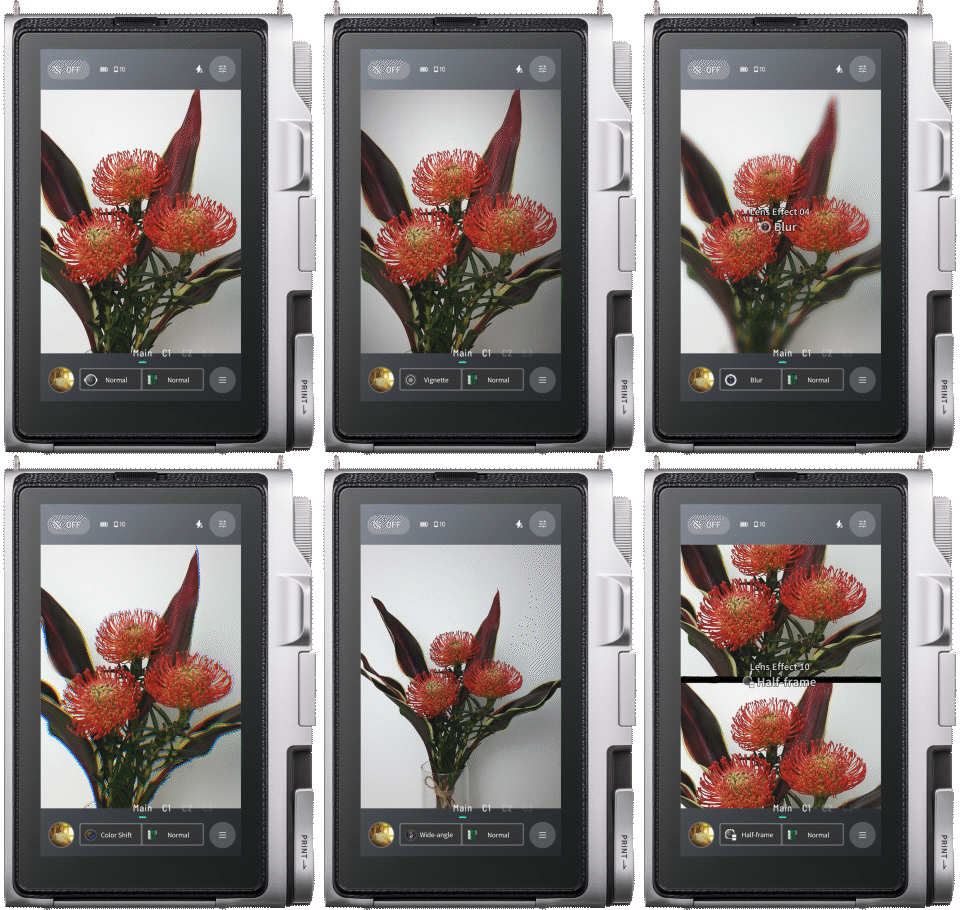
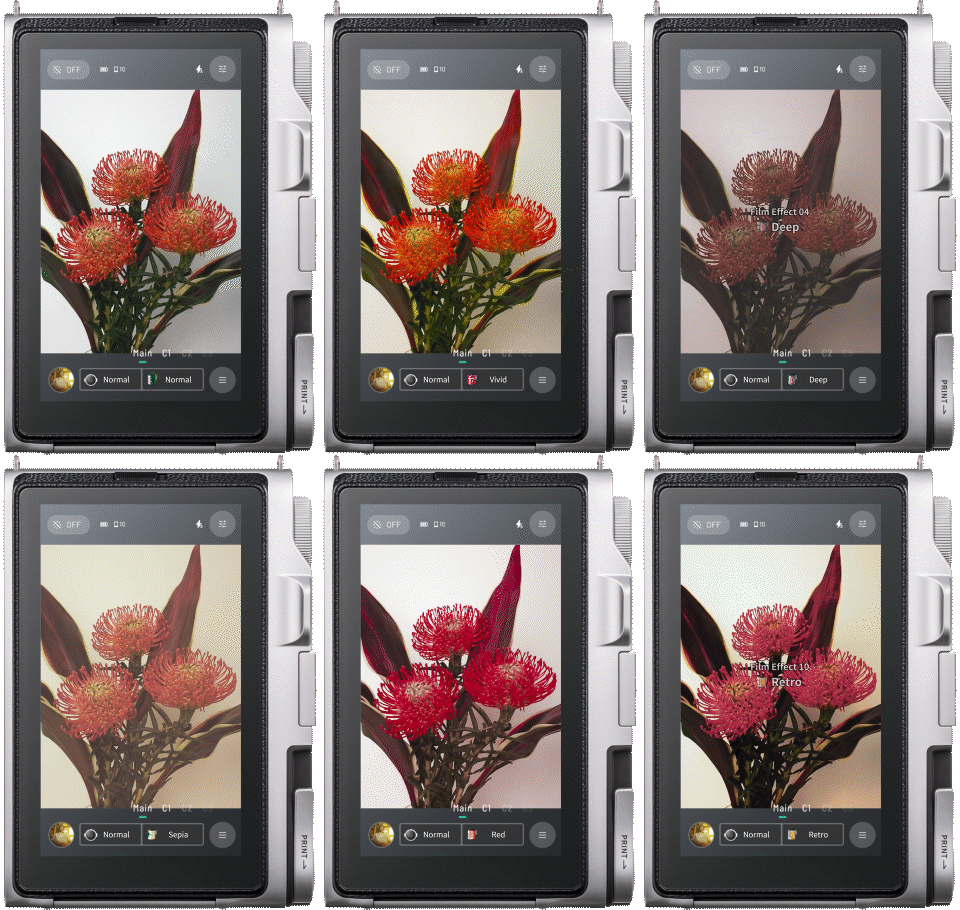
100 Different Expressions
Use the lens and film dials in combination to express your creativity in 100 different ways.
Set up and capture your unique shots using the LCD screen.
The mini Evo sparks ideas to unlock endless ways to express yourself!

Normal

Vignette

Soft Focus

Blur

After Image

Color Shift

Wide-angle

Light Leak

Double Exposure

Half-Frame


10Lens Effects
Set the light just how you want it
with 10 different lens effects.


10Film Effects
Express incredible nuance
with 10 different film effects.

Normal

Vivid

Pale

Deep

Monochrome

Sepia

Yellow Green

Red

Blue

Retro

10 Lens Effects
Set the light just how you want it with 10 different lens effects.


10 Film Effects
Express incredible nuance with 10 different film effects.



02
instax Expanded View™
See beyond the shooting area to frame and capture your subject, effortlessly.
03
instax Immersive Movie™
Capture the action before a picture is taken with a mini video*. Watch it back to relive the moment.
*Five seconds of video is recorded (including the moment the shutter is pressed). Audio is not recorded.


instax mini Evo™ App
Even better with the dedicated app!

*Apple and the Apple logo are trademarks of Apple Inc., registered in the U.S. and other countries and regions. App Store is a service mark of Apple Inc
*Google Play and the Google Play logo are trademarks of Google LLC.
*Please check the app download sites (iOS, Android) for availability, as the app may not be compatible depending on your smartphone's operating system.
*If you have already installed the app, please make sure you are running version v3.0.0 or later.
Easy Transfer
Transfer digital versions of printed images, along with videos, to the app over Wi-Fi or Bluetooth®.
*Photo transfer is supported via Bluetooth® only.

Print History
View the videos and images you’ve transferred to the app in your print history, and even add short comments to them.

Share
Using the dedicated app, easily edit transferred images and videos. You can also share them with friends or post them on social media with ease.
*Photo transfer is supported via Bluetooth® only.

01/ 03


Other Features
01
Camera Editing
Get the results you want, right on the spot.
Easily edit your photos in-camera, with tools for cropping, brightness, contrast and saturation.


02
High Quality Print
Choose between the soft tones of instax-Natural Mode™ and the vivid look of instax-Rich Mode™ to create photos that reflect your style.

instax-Natural Mode™

instax-Rich Mode™
03
Remote shooting
Control the camera remotely from your smartphone to take photos or shoot an instax Immersive Movie™.


WHITE
10 shots x 1 pack

Attachment
Shoulder strap


Accessories*Sold separately
Camera Case


Accessories for even more exciting ways to take photos!
*Sold separatelyAdd external accessories, such as an LED lights, viewfinder, etc to the accessory shoe or tripod mount and unlock even more creative possibilities and fun.

instax mini Evo™
*Apple and the Apple logo are trademarks of Apple Inc., registered in the U.S. and other countries and regions. App Store is a service mark of Apple Inc
*Google Play and the Google Play logo are trademarks of Google LLC.
*Please check the app download sites (iOS, Android) for availability, as the app may not be compatible depending on your smartphone's operating system.
*If you have already installed the app, please make sure you are running version v3.0.0 or later.
- *Images of instax™ photos are for illustrative purposes only.
- *Develops in approx. 90secs.
- *The above specifications are subject to change for performance improvement.
- *Image size may affect the finish (sharpness, grain, etc.).
- *Time required for wireless communication may be affected by file size, smartphone model, etc.
- *The photo print finish (color, image quality, etc.) may be affected by smartphone model, shooting conditions, etc.
- *Actual finish may differ from the image displayed on the LCD screen of your smartphone.
- *Smartphone screen images are superimposed.
- *LCD screen images are for illustrative purposes only. Actual screens may differ from those depicted.
- *The Bluetooth® word mark and logo are registered trademarks of Bluetooth SIG, Inc. and FUJIFILM Corporation uses these under license.
- *QR code is a registered trademark of DENSO WAVE INCORPORATED.
- *FUJIFILM, instax, instax mini Evo 2, instax Expanded View, instax Immersive Movie and “don’t just take, give.” are registered trademarks of FUJIFILM Corporation.
- *Apple and the Apple logo are trademarks of Apple Inc., registered in the U.S. and other countries and regions. App Store is a service mark of Apple Inc.
- *Google Play and the Google Play logo are trademarks of Google LLC.

Have you ever wondered what gives your favorite instax™ photos their unique look?
The secret lies within the film, and we’re ready to share all >>>
Film that’s filled
with technology
Point 1
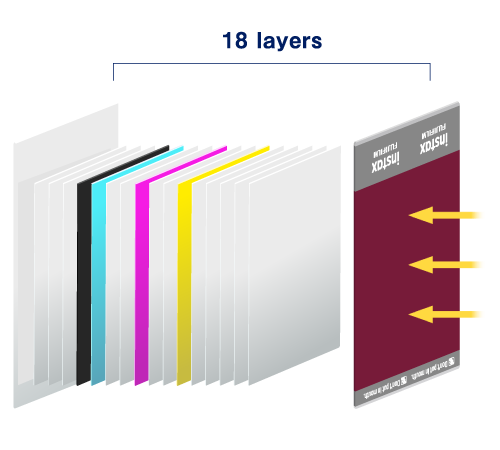
Let’s start with an exploded view of instax™ film. Whether it’s mini, SQUARE or WIDE, they’re all packed with innovations that make developing and printing photos possible.
Point 2
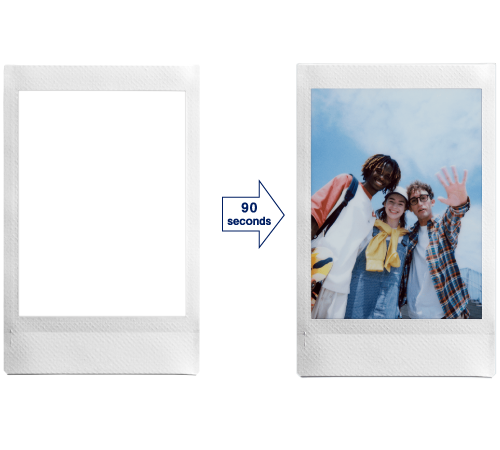
The photograph gradually emerges over approximately 90 seconds.
Point 3
instax™ photos feature silver halide technology to get their unique, high-quality look.Plus, instax™ photos are water resistant and ideal for storing even in wallets and phone cases. Now that's some serious film technology!


Have even more fun with
the instax UP!™ app
With the introduction of AI, you can now scan an instax™ photo regardless of the background or angle, or even in your hand.


- ●Apple and the Apple logo are trademarks of Apple Inc., registered in the U.S. and other countries and regions. App Store is a service mark of Apple Inc.
- ●Google Play and the Google Play logo are trademarks of Google LLC.
-
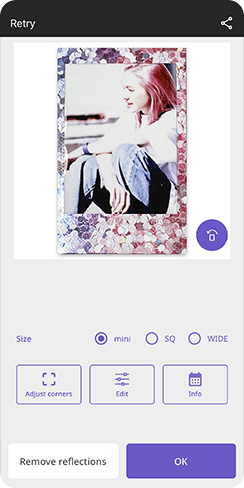 STEP1Scan instax™ photos using high-quality AI scanning
 -
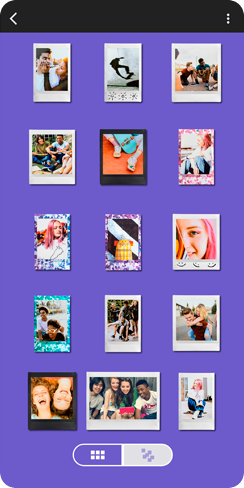 STEP2Organize your collection of scanned instax™ photos
 -
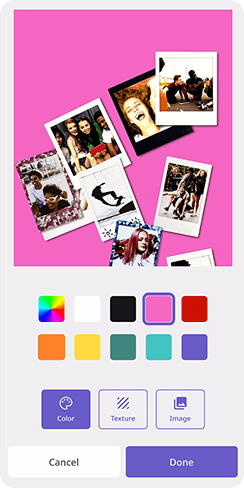 STEP3Share your gallery across social media
All your instax™ photos, digitally in one place
Learn more